Showing posts with label oracle. Show all posts

Monday, November 4, 2013

Oracle 12c on Linux Part Deux: SQL Developer

Assuming that you have successfully installed Oracle 12c on your Linux box (and if you don't know how to accomplish that, look here), one of the next things you'll probably want to do is to get SQL Developer up and running.

In the next post (Part Three) I'll talk about how to access the sample schemas, which, as of 12c, are now tucked away inside "pluggable" databases.

1. Install Java (specifically JDK 7u45 & NetBeans 7.4, or something more or less equivalent). The download can be found here: http://www.oracle.com/technetwork/java/javase/downloads/index.html. Follow the installation instructions found here: http://www.oracle.com/technetwork/java/javase/downloads/jdk-7-netbeans-install-433844.html#linux

2. Download SQL Developer 4 rpm file. The download is here:  http://www.oracle.com/technetwork/developer-tools/sql-developer/downloads/sqldev-download-v4-1925679.html

3. Install SQL Developer following the instructions found here: http://www.oracle.com/technetwork/developer-tools/sql-developer/downloads/sqldev-install-linux-1969676.html

4. During the installation you should probably accept all the defaults, at least as far as where things are to be installed (/usr/local/). If you get a "DISPLAY" error at this point (or at any other point) refer to step #5 in the previous post.

5. Once the installation completes, log in as the oracle user and just execute "sqldeveloper". The first time you fire up SQL Developer it will ask you where your JDK is, and you should enter something like this: /usr/local/jdk1.7.0_45.

6. That's it! I really should be that simple. As long as you know your way around Linux, and you have installed Oracle properly in the first place, there should be no problems. But if you do run into any problems feel free to leave a comment and I will see if I can help you out!

Sunday, November 3, 2013

Oracle 12c Cheat Sheet for Linux (part one)

This blog post will cover the basic steps that will get you to the point where you have Oracle12c up and running on a Linux system. I am assuming Oracle Linux, but I have also verified that (with a few tweaks here and there, perhaps) things work pretty much the same with CentOs.

In Part Two I will talk about accessing "pluggable" databases (which you need to get to the sample schemas, such as "hr", etc), and also getting SQL Developer up and running.

1. Install latest version of Oracle Linux. I did this on a virtual machine using Vmware Workstation 10 running on Windows 8 Pro. More details are here : Installing Oracle Linux on a virtual machine.

2. Apply Oracle's set up scripts via yum (see https://blogs.oracle.com/wim/entry/easily_install_oracle_rdbms_12cr1) for some more details:

sudo yum install oracle-rdbms-server-12cR1-preinstall

3. Create directory /home/OraDB12c and download the two installation zip files here. (look here if you don't know how to do this: http://www.oracle.com/technetwork/articles/servers-storage-admin/ginnydbinstallonlinux-488779.html).

4. IMPORTANT: Before installation you must manually create /oradata as root (or at least this was the case when I did it - despite the claim that the "setup" scripts were supposed to take care of this kind of thing):

mkdir /oradata
chown oracle /oradata
chgrp oinstall /oradata

5. Depending on what other configuration you have done on your linux box, there might be one more mthing before the install! Execute this command as root:

xhost +SI:localuser:oracle

6. Now run the installation script as the "oracle" user. The script is called "runInstall", and it should be found in the directory /home/OraDB12c/database. If you get a "DISPLAY" error, see step #5 above. During installation there is a step that requires manually running some more scripts (AS ROOT). These scripts get installed as part of the installation process - you will be prompted to do this at the appropriate time.

7. After installation completes successfully you must still manually set the the environment variables ORACLE_HOME, ORACLE_BASE, and ORACLE_SID, and also update your path (and when updating the path you should explicitly add ORACLE_HOME/bin). Here is what I put in my .bashrc file (for the "oracle" user) to accomplish this:

ORACLE_SID="orcl"; export ORACLE_SID
ORACLE_HOME="/home/oracle/app/oracle/product/12.1.0/dbhome_1/"; export ORACLE_HOME
ORACLE_BASE="/home/oracle/app/oracle/product/12.1.0/"; export ORACLE_BASE
PATH=$PATH:$ORACLE_BASE:$ORACLE_HOME:$ORACLE_HOME/bin; export PATH


7. At this point you should log in as the "oracle" user and you should be able to fire up sqlplus as usual:

sqlplus / as sysdba

8. If that doesn't work then you can either google the error message(s) you get, and/or leave a comment below and I'll try to help you out!

9. Note that Oracle has apparently changed the default locations for ORACLE_HOME and ORACLE_BASE. If you are unsure about what to set these environment variables to, check out this blog post by Kevin Closson: "Using Linux /proc To Identify ORACLE_HOME and Instance Trace Directories."

Here is the two step process for discovering where ORACLE_HOME is using /proc:

Step 1: ps -ef | grep lgwr | grep -v grep

Step 2: ls -l /proc/<PID>/exe

In my case the oracle home turned out to be, very reasonably, /home/oracle/app/oracle/product/12.1.0/dbhome_1/. In other words, it is the same as the "old style" ORACLE_HOME, but with "/u01/" replaced by "/home/oracle/". ORACLE_BASE is just the directory immediately above ORACLE_HOME.

Wednesday, October 23, 2013

My Oracle 12c Cheat Sheet (for Windows)

I. installation

To install Oracle 12c on Windows, follow the excellent, step by step instructions given at this blog post by Tomaz Lesinski:
http://dbaora.com/install-oracle-12c-12-1-0-1-on-windows/
If you follow Tomasz Lesinski's sage advice, then all should go well. You might need to manually intervene during the installation process to "allow access" through your Windows Firewall (or you could turn the firewall off during the install). And if you encounter any "file not found" errors during the install, this probably means that the zip files got corrupted during the download, so just delete them and repeat the download.

II. using the sample schemas

To locate the sample schemas (hr, sh, oe, etc) which are now hidden away in "pluggable" databases, follow the simple explanations and directions given at the "slowdatum" blog here:
http://slowdatum.wordpress.com/2013/07/25/oracle-12c-finding-example-schema-hrshoe-etc/

Here are the essential six steps:
1. From the command line, enter SQLPLUS the usual way with:
sqlplus / as sysdba

2. In SQLPLUS connect to the "pluggable" database like this:
SQL> connect sys/pass@localhost:1521/pdborcl as sysdba

3. Now you must start up the pluggable database (by executing the command "startup").

4. Unlock the sample schemas (you only have to do this the first time you use them), for example:
SQL> alter user hr identified by hr account unlock;

5. Now you can connect to the hr account:
SQL> connect hr/hr@localhost:1521/pdborcl

6. Before you can connect to "hr" (etc) in SQLDeveloper, you must first unlock the accounts in SQLPLUS (as described in #4 above). Then to create the connection the slightly tricky part is that for accounts in pluggable databases you don't use the SID, rather you use the "Service Name", which by default should be "pdborcl".

III. to plug or not to plug?

What if you don't want to mess with pluggable databases? Here are a couple of things that you might find helpful:
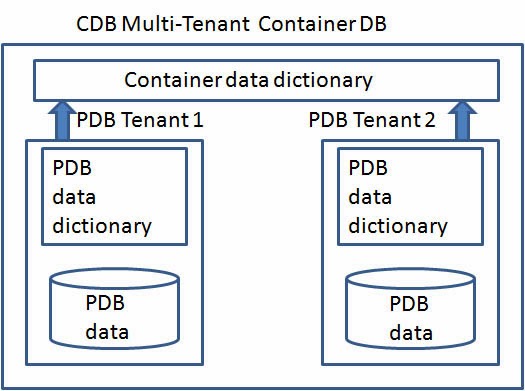
1. In "container" databases (that is, non-pluggable ones) usernames must start with "C##". This does not apply to users in pluggable databases. Basically, the New Order as of 12c is that "container" databases (as opposed to "pluggable" databases) have "common" users, as opposed to "local" users which one has in the "pluggable" databases. Anyway, "common" usernames must start with "C##".
2. Previously (in 11g, for example) when you created a new user, and you wanted that user to have sufficient privileges to do stuff, you could do something like this (for a user called, for example, c##student):

GRANT CONNECT, RESOURCE TO c##student;
GRANT SELECT_CATALOG_ROLE TO c##student;
GRANT CREATE VIEW TO c##student;
BUT now (at least this is what I have found) you must also do the following:
GRANT UNLIMITED TABLESPACE TO c##student.

For more on container databases, common users, etc, check out some of these links:

Tuesday, October 22, 2013

A closer look at a simple PL/SQL procedure

Please refer to page 569 of Steven Feuerstein's classic "Oracle PL/SQL Programming", the fifth edition. This blog post will focus on the procedure "apply_discount". Before going any further, note the following three important things: 
1. To actually create the procedure, the "PROCEDURE" keyword must, obviously, be preceded by the "CREATE" keyword.
2.  Two typos exist on line 11: (i) change ":=" to just "=", and (ii) remove the semicolon at the end of the line.
3. The table name "order" is invalid (it raises a "ORA-00903: invalid table name" error), because "order" is a reserved word, so change it to "order_table".

Now let's get down to business.

1. First, create the tables:


CREATE TABLE ORDER_TABLE
  (    ITEM_ID NUMBER,
       ORDER_ID NUMBER,
       ITEM_AMOUNT NUMBER);

CREATE TABLE ITEM
  (    COMPANY_ID NUMBER,
       ORDER_ID NUMBER,
       SALESPERSON_ID NUMBER);

CREATE TABLE COMPANY
  (    COMPANY_ID NUMBER,
       COMPANY_NAME VARCHAR2(30));


---------------------------------------------

2. Second, populate the tables with some data:


insert into order_table
values (1, 1, 3);
insert into order_table
values (2, 1, 4);
insert into order_table
values (3, 2, 5);

insert into item
values (1, 1, 10.0);
insert into item
values (2, 1, 20.0);
insert into item
values (1, 2, 10.0);
insert into item
values (3, 2, 30.0);
insert into item
values (2, 3, 20.0);

insert into company
values (1, 'bozo_inc');
insert into company
values (2, 'bus_inc');

---------------------------------------------

3. Third, create the procedure


  1. CREATE PROCEDURE apply_discount
  2.  (company_id_in IN company.company_id%TYPE, discount_in IN number)
  3. IS
  4.  min_discount CONSTANT NUMBER := 0.05;
  5.  max_discount CONSTANT NUMBER := .25;
  6.  invalid_discount EXCEPTION;
  7. BEGIN
  8.  IF discount_in BETWEEN min_discount AND max_discount
  9.   THEN
  10.    UPDATE item
  11.     SET item_amount=item_amount*(1-discount_in)
  12.    WHERE EXISTS ( SELECT 'x' FROM order_table
  13.     WHERE order_table.order_id=item.order_id
  14.      AND order_table.company_id=company_id_in);
  15.   IF SQL%ROWCOUNT = 0 THEN RAISE NO_DATA_FOUND; END IF;
  16.  ELSE
  17.   RAISE invalid_discount;
  18.  END IF;
  19. EXCEPTION
  20.  WHEN invalid_discount
  21.  THEN
  22.   DBMS_OUTPUT.PUT_LINE('The specified discount ('||discount_in||') is invalid.');

  23.  WHEN NO_DATA_FOUND
  24.  THEN
  25.   DBMS_OUTPUT.PUT_LINE('No orders in the system for this company: '||
  26. TO_CHAR(company_id_in))
  27. END apply_discount;
For your cutting and pasting convenience, here it is without the line numbers:

CREATE PROCEDURE apply_discount
 (company_id_in IN company.company_id%TYPE, discount_in IN number)
IS
 min_discount CONSTANT NUMBER := 0.05;
 max_discount CONSTANT NUMBER := .25;
 invalid_discount EXCEPTION;
BEGIN
 IF discount_in BETWEEN min_discount AND max_discount
  THEN
   UPDATE item
    SET item_amount=item_amount*(1-discount_in)
   WHERE EXISTS ( SELECT 'x' FROM order_table
     WHERE order_table.order_id=item.order_id
      AND order_table.company_id=company_id_in);
  IF SQL%ROWCOUNT = 0 THEN RAISE NO_DATA_FOUND; END IF;
 ELSE
  RAISE invalid_discount;
 END IF;
EXCEPTION
 WHEN invalid_discount
 THEN
  DBMS_OUTPUT.PUT_LINE('The specified discount ('||discount_in||') is invalid.');

 WHEN NO_DATA_FOUND
 THEN
  DBMS_OUTPUT.PUT_LINE('No orders in the system for this company: '||TO_CHAR(company_id_in))
END apply_discount;

---------------------------------------------

4. Fourth, check to make sure things are as they should be:


select i.item_id, i.order_id, c.company_name, i.item_amount
from item i join order_table o on (i.order_id = o.order_id)
join company c on (o.company_id = c.company_id)
order by 1;

   ITEM_ID   ORDER_ID COMPANY_NAME                   ITEM_AMOUNT
---------- ---------- ------------------------------ -----------
         1          1 bozo_inc                                10
         1          2 bozo_inc                                10
         2          3 bus_inc                                 20
         2          1 bozo_inc                                20
         3          2 bozo_inc                                30


Notes:
a. According to the data loaded into the tables in Step 2 above, there are two companies, three orders, and five line items spread across those three orders. All of the data is summarized in the select statement directly above.
b. For this data, the "item" table has one line for each line item in each order. Therefore, the item_id field is not unique. If you wanted to (and you should want to!) have a primary key on this table it would be a composite key made up of "item_id" and "order_id". There should probably also be a "qty" field. And a better name for the table would be "line_item".

---------------------------------------------

5. Fifth run the procedure (after making a backup):


create table item_bup as select * from item;
Table created.
execute apply_discount(2, 0.15);
PL/SQL procedure successfully completed.

---------------------------------------------

6. Sixth, compare with results from step Four above:


  ITEM_ID   ORDER_ID COMPANY_NAME                   ITEM_AMOUNT
---------- ---------- ------------------------------ -----------
         1          1 bozo_inc                                10
         1          2 bozo_inc                                10
         2          3 bus_inc                                 17
         2          1 bozo_inc                                20
         3          2 bozo_inc                                30


Notes: The discount was correctly applied to only items ordered by company #2, "bus_inc".

--------------------------------------------- 

7. Seventh, restore original table and rerun on other company:


drop table item;
create table item as select * from item_bup;
execute apply_discount(1, 0.15);


   ITEM_ID   ORDER_ID COMPANY_NAME                   ITEM_AMOUNT
---------- ---------- ------------------------------ -----------
         1          1 bozo_inc                               8.5
         1          2 bozo_inc                               8.5
         2          3 bus_inc                                 20
         2          1 bozo_inc                                17
         3          2 bozo_inc                              25.5


This time, the discount was applied to items ordered by company #1, but the price for items ordered by company #2 were left unchanged.

---------------------------------------------


8. What's up with that "WHERE EXISTS" statement?


The where statement on line 13 (refer to the procedure in Step 3 above) is unnecessarily convoluted, or is it? The following select statement would achieve the same results, and is more straightforward:


WHERE order_id in 
    (select order_id 
     from order_table 
       where company_id = company_id_in)

But "EXISTS" is famously more efficient than "IN":
http://stackoverflow.com/questions/2065329/sql-server-in-vs-exists-performance/2065374#2065374

Also, "IN" can cause serious problems related to "three-value logic" (ie, NULLs).

Also check out this interesting discussion of IN versus JOIN versus EXISTS:
http://www.gregreda.com/2013/06/03/join-vs-exists-vs-in/


Wednesday, October 16, 2013

SQL Fundamentals Final Project

Since I won't be at the final class, I am posting this for my "team-mates" Victoria and Ed (right now it's incomplete, but I hope to have it finished by the time class starts at 6:30.....):
-------------------------------------------------------------------------------------------

#7.
create sequence emp_seq start with 207;

#8.
alter table emp
add constraint pk_emp_empid
primary key (employee_id);

#9.
alter table dept
add constraint pk_dept_depid
primary key (department_id);

#10.
alter table emp
add constraint fk_emp_depid
foreign key (department_id)
references dept (department_id);

#11.
insert into emp
(employee_id, last_name, email, hire_date, job_id, department_id)
values
(emp_seq.nextval, 'Steinmetz', 'curt@nowhere.com', sysdate, 'IT_PROG', 60);

#13:
select first_name||' '||last_name "Full Name", department_name
from emp join dept
using (department_id)
order by department_name;

#14.
select first_name||' '||last_name, salary, employee_id
from emp
where salary >= (select max(salary) from emp);

#15
select last_name, job_id, department_id, department_name, city
from emp join dept
using (department_id)
join location
using (location_id)
where upper(city) like 'SEATTLE';

(NOTE: REPLACE 'SEATTLE' WITH 'TOKYO')

#16.
select last_name,
to_char(hire_date, 'MM/DD/YYYY') "Hire Date",
to_char(salary, '$999,999.99') "Salary"
from emp

#17., #18, #19
create table emp5
as select * from emp
where 1 = 2;
create table emp8
as select * from emp
where 1 = 2;
create table empall
as select * from emp
where 1 = 2;

#20.
insert all
when department_id = 50 then into emp5 values
(EMPLOYEE_ID,FIRST_NAME,LAST_NAME,EMAIL,PHONE_NUMBER,HIRE_DATE,JOB_ID,SALARY,COMMISSION_PCT,MANAGER_ID,DEPARTMENT_ID)
when department_id = 80 then into emp8 values
(EMPLOYEE_ID,FIRST_NAME,LAST_NAME,EMAIL,PHONE_NUMBER,HIRE_DATE,JOB_ID,SALARY,COMMISSION_PCT,MANAGER_ID,DEPARTMENT_ID)
when last_name is not null then into empall values
(EMPLOYEE_ID,FIRST_NAME,LAST_NAME,EMAIL,PHONE_NUMBER,HIRE_DATE,JOB_ID,SALARY,COMMISSION_PCT,MANAGER_ID,DEPARTMENT_ID)
select EMPLOYEE_ID,FIRST_NAME,LAST_NAME,EMAIL,PHONE_NUMBER,HIRE_DATE,JOB_ID,SALARY,COMMISSION_PCT,MANAGER_ID,DEPARTMENT_ID
from emp

where department_id =
(select department_id from emp
where upper(last_name) = 'MATOS');